
Alerts for stale skipped and disabled CI tests
TestNod's stale skipped tests alert tells you when a skipped or disabled test hasn't run in CI for longer than you're willing to leave it, which is 30 days by default. Each alert names the test and the run where its current streak of skips began, and the email includes the skip reason when your test runner reports one.
Teams often quarantine a test by skipping it with a tag or an annotation, and those are the tests this alert keeps track of. It works from the skipped results your test framework already writes into its JUnit XML reports, so there's nothing to add to your tests. If you'd rather watch the share of tests each run skips than individual tests, use the skipped test count creep alert.
Skip markers TestNod picks up from JUnit XML
Any test your runner reports as skipped in its JUnit XML counts. These are the markers most teams use:
| Framework | Markers that report a test as skipped |
|---|---|
| RSpec | skip, xit, xdescribe, and pending |
| pytest | pytest.mark.skip, pytest.mark.skipif, and pytest.skip() |
| JUnit | @Disabled in JUnit 5 and @Ignore in JUnit 4 |
| Jest and Vitest | test.skip, it.skip, describe.skip, and xit |
| Playwright | test.skip() and test.fixme() |
If your framework isn't listed, check whether its JUnit reporter writes a <skipped> element for the test. The JUnit XML format page shows what TestNod expects.
How TestNod measures how long a test has been skipped
When a test run finishes processing, TestNod looks at each test the run skipped and works backwards through earlier runs that share the same set of tags. It finds the last run where that test wasn't skipped, and the first skipped run after that one is where the skip streak starts. The age of the streak is the time between that run and the new one.
A single run where the test runs, whatever its result, resets the streak. If someone unskips a test for a day and then skips it again, the count starts over. Runs with a different tag set don't count either way. For example, a test that's skipped in your integration runs but still runs in your unit runs is measured only against other integration runs.
TestNod looks back through up to a year of runs, so a test that has been skipped for longer than that shows an age of about a year.
When a stale skipped test alert fires
The alert fires once per skip streak, on the first run that finishes after a test has been skipped for at least the threshold. Later runs don't alert again while the test stays skipped, so a test that sits skipped for six months produces a single alert. If the test runs and someone skips it again later, that starts a new streak, which gets its own alert when it reaches the threshold.
When several tests reach the threshold on the same run, TestNod records them as one alert event and sends one notification listing all of them. The same thing happens the first time you turn the alert on for a project that already has old skipped tests, so the whole backlog arrives in one email.
Because each streak only fires once, this alert doesn't use the 24-hour notification cooldown that the other alert types have. If two runs on the same day each push a different test past the threshold, you get two notifications. Snoozing the alert still holds notifications back, and any events recorded during the snooze appear on the alert page but aren't sent again once the snooze ends.
What the alert event shows
Each occurrence on the alert detail page reads as a single line. When one test reached the threshold, the line names the test and its suite and says how many days it has been skipped since the run where the streak started. When several tests reached it on the same run, the line gives the number of tests and the threshold, then names each one. Every occurrence links back to the run that triggered it, and the tag set behind the check is shown near the top of the alert page.
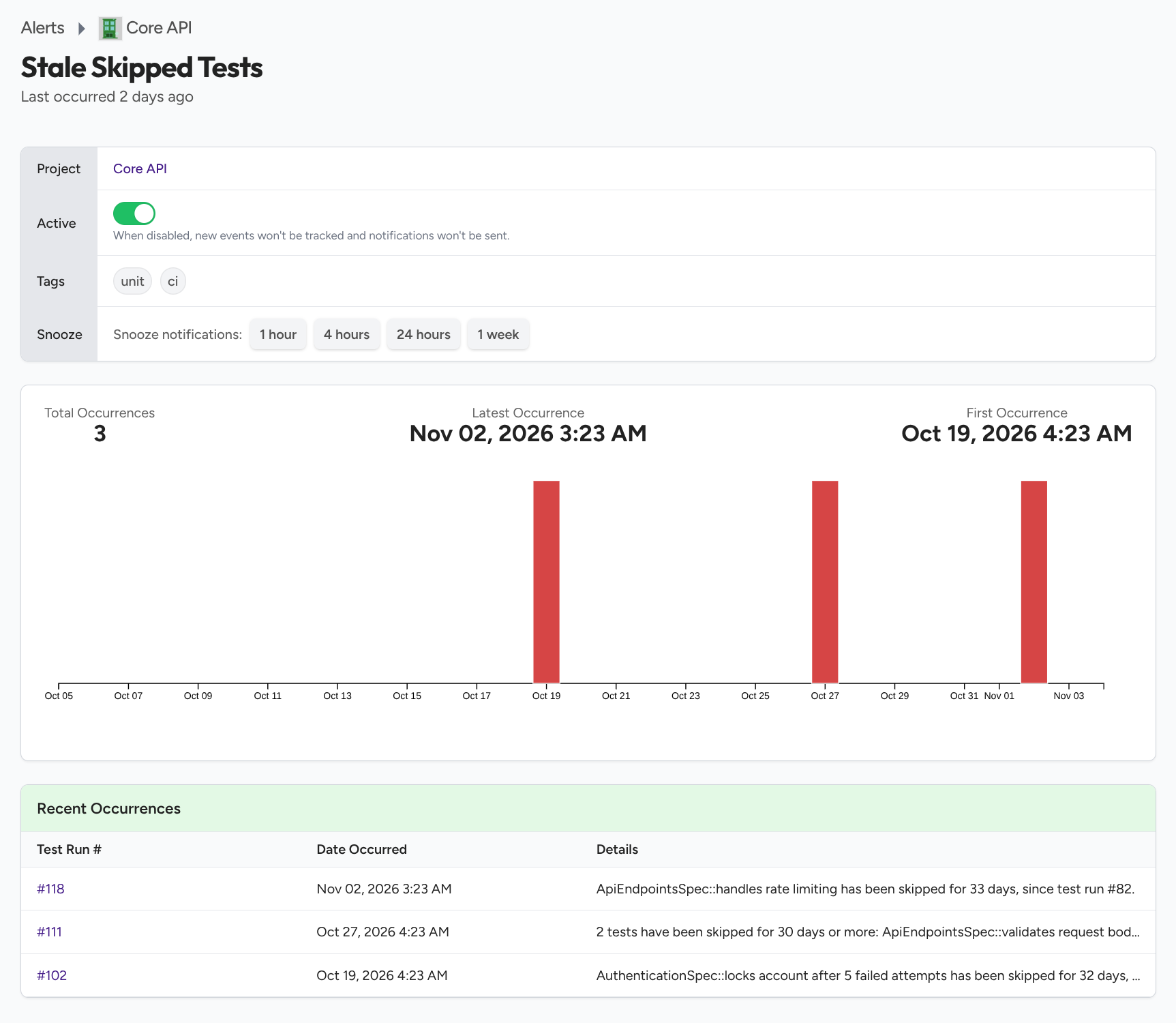
The email goes into more detail, listing each test with:
- Test: the test name and the suite it belongs to.
- Reason: the skip message from your JUnit XML, when your test runner wrote one.
- Skipped since: a link to the run where the streak started, with the date of that run.
- Age: how many days the test had been skipped when the alert fired.
Slack messages list up to five tests along with how many days each one has been skipped, then say how many more there are. The webhook payload and the alerts API include every test in the event.
You can see the same "Skipped since" line on the test case page for any skipped test, even when the alert is turned off.
Choosing how many days a test can stay skipped
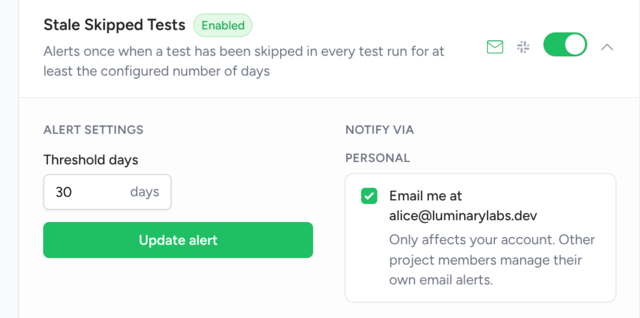
The threshold is a number of days between 1 and 365, and the default of 30 catches tests that have stayed skipped for about a month. Teams that expect a skip to last no longer than a sprint can lower it to 14 days. If your project keeps some tests skipped on purpose for the long term, raise it to 90 days or more so you only hear about the oldest ones.
Project admins set the threshold from the alert configuration page, where the field for this alert is labeled Threshold days. See Configuring alerts for the walkthrough.
What the alert does not catch
- Tests missing from the report. The alert only sees tests your JUnit XML lists as skipped. A deleted test, or one left out by a command-line or tag filter, usually isn't in the report at all. The What Changed panel lists tests that disappeared between runs.
- Tag sets newer than the threshold. A test can only be flagged once its tag set has runs going back at least as far as the threshold. With the default of 30 days, a tag set you started using last week won't alert yet.
- Streaks that broke while the alert was off. TestNod only sees a skipped test run again on runs it checks while the alert is on. If a test you were alerted about runs while the alert is turned off and is then skipped again, the new streak doesn't trigger an alert.
Where to start
An admin turns on the stale skipped tests alert and sets its threshold from the alert configuration page. On the next run that finishes, any tests that have already been skipped for longer than the threshold are recorded as one event on the alert detail page, and TestNod emails the project members who haven't opted out.
If you're not sending test runs to TestNod yet, start with the Quickstart.