
REST API for test results and alerts
TestNod's JSON API gives you programmatic access to the data behind the dashboard: your projects, every test run with the test suites and test cases inside it, and the alerts that fired along the way. It is a conventional REST API over HTTPS, and most of it is read-only. You can rename a project and change an alert's state, but test results themselves arrive through the submission API and are never edited afterward.
This API is separate from the upload endpoints: uploads authenticate with a per-project token, while everything documented here uses a single organization-wide API key.
Base URL and API versioning
https://testnod.com/api/v1
The version sits in the path. Additive changes such as a new field or a new endpoint arrive in v1 without a version bump, so parse responses leniently and ignore keys you do not recognize. Anything that would break an existing client ships as /api/v2 instead.
Authenticating with a bearer API key
Every request needs your organization's API key in an Authorization header:
curl -H "Authorization: Bearer $TESTNOD_API_KEY" \
  https://testnod.com/api/v1/organization
The key carries the same reach as an organization admin, covering every project in the organization. Treat it like a password: keep it in a secrets manager or a CI secret, never in source control.
A missing, malformed, or regenerated key gets a 401:
{ "error": { "code": "unauthorized", "message": "Invalid or missing API key." } }
Managing and rotating your API key
Your organization gets a key automatically, and admins find it in the API Key card on the Team page. Members cannot see it.
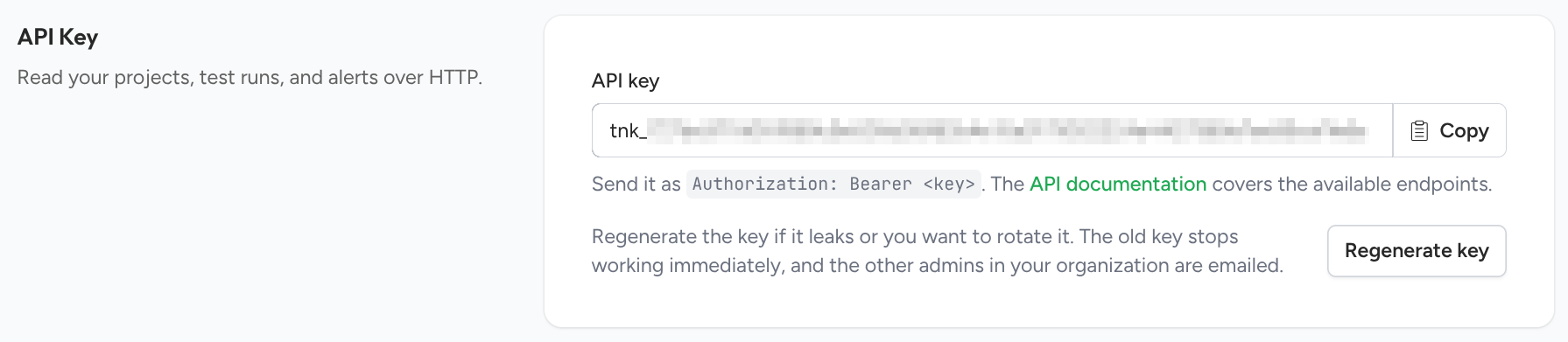
Regenerating replaces the key immediately, so the previous one starts returning 401 on the next request. Every admin in the organization is emailed when it happens, which makes an unexpected rotation easy to spot. Rotate the key whenever it might have leaked, and update your stored secret right after.
Your organization
GET /api/v1/organization
Returns the organization the key belongs to, which is the quickest way to confirm a key works and to see which organization it opens:
{
  "id": "a41e8d33-...",
  "name": "Acme Inc.",
  "time_zone": "America/New_York",
  "created_at": "2026-01-09T15:33:07Z",
  "api_key": {
    "id": "6b0f7c92-...",
    "name": "Default",
    "created_at": "2026-01-09T15:33:07Z"
  }
}
The api_key object describes the key you authenticated with, but never repeats the key itself. The only place to read that is the Team page.
JSON response format
A single resource comes back as a JSON object. The example below is a project:
{
  "id": "3f1a2b7c-...",
  "name": "Core API",
  "description": "Backend service test suite",
  "test_runs_count": 482,
  "latest_result": "tests_passed",
  "last_test_run_at": "2026-08-30T09:12:44Z",
  "created_at": "2026-01-14T18:02:11Z",
  "updated_at": "2026-08-30T09:12:44Z",
  "url": "https://testnod.com/projects/3f1a2b7c-..."
}
A collection wraps its items in data and adds a pagination object, and timestamps are ISO 8601 in UTC throughout.
Every id matches what the web app uses in its own URLs, so you can paste one into a browser and land on the right page. The format varies by resource: organizations, projects, and alerts use a UUID, test runs and test suites use a number that counts up within their parent, and test cases and alert events use a number that does not restart per parent. As an example, a test run with an id of 482 is the 482nd run in its project, and the same number in another project refers to a different run.
Cursor pagination
List endpoints return results a page at a time. Each response includes a next_cursor that you pass back to fetch the following page.
| Parameter | Default | Notes |
|---|---|---|
limit |
25 | Maximum 100. Values above that are capped, and a value below 1 is a 400. |
cursor |
none | The next_cursor from the previous response. It is opaque, so pass it back exactly as you received it. |
{
  "data": [ { "id": "..." } ],
  "pagination": { "next_cursor": "aWQ6NDIx", "has_more": true }
}
Keep requesting until has_more is false, at which point next_cursor is null. Responses carry no total count, so that flag is the only signal that you have reached the end. A cursor that has been edited or truncated returns a 400, and a cursor only makes sense to the listing that issued it, so do not carry one from one endpoint to another.
Error codes
Every failure returns the same envelope with an HTTP status and a stable code worth branching on. The message is for humans and may be reworded.
{
  "error": {
    "code": "validation_failed",
    "message": "The submitted data is invalid.",
    "details": [ { "field": "name", "message": "can't be blank" } ]
  }
}
| Status | Code | When |
|---|---|---|
| 400 | invalid_request |
A bad cursor or limit, an unknown filter value, or a malformed JSON body. |
| 401 | unauthorized |
The API key is missing, malformed, or no longer valid. |
| 403 | forbidden |
The key may not perform this action. |
| 404 | not_found |
The resource does not exist, or belongs to another organization. |
| 422 | validation_failed |
The request was understood but the data was rejected. Carries details. |
| 429 | rate_limited |
Too many requests. Back off and retry. |
Resources that belong to another organization return 404 rather than 403.
API rate limits
Each API key is capped at 600 requests per minute. Going over returns 429 with the rate_limited code. If you are backfilling data, page through with a modest limit and pause when you see a 429 rather than retrying immediately.
Where to go next
- Projects API for listing projects and editing their details.
- Test runs API for runs, JUnit test suites, and individual test cases.
- Alerts API for alerts, their event history, and snoozing.