
GitHub Actions integration for JUnit XML uploads
The TestNod uploader action sends your JUnit XML reports to TestNod from a GitHub Actions workflow. It keeps the change to your CI down to a single step, and it handles the upload and finalize flow for you, so there are no API calls to script yourself.
If you haven't created a project yet, the Quickstart walks through that and adding your first upload step. This page picks up from there, covering the action's inputs along with the patterns for matrix builds, parallel runners, and pull requests from forks.
Add the project token as a GitHub secret
In your repository, open Settings → Secrets and variables → Actions and add a repository secret named TESTNOD_PROJECT_TOKEN, using the project token from your project's settings page in TestNod as the value. The workflow reads it through ${{ secrets.TESTNOD_PROJECT_TOKEN }}, so the token never appears in your workflow YAML or in workflow logs.
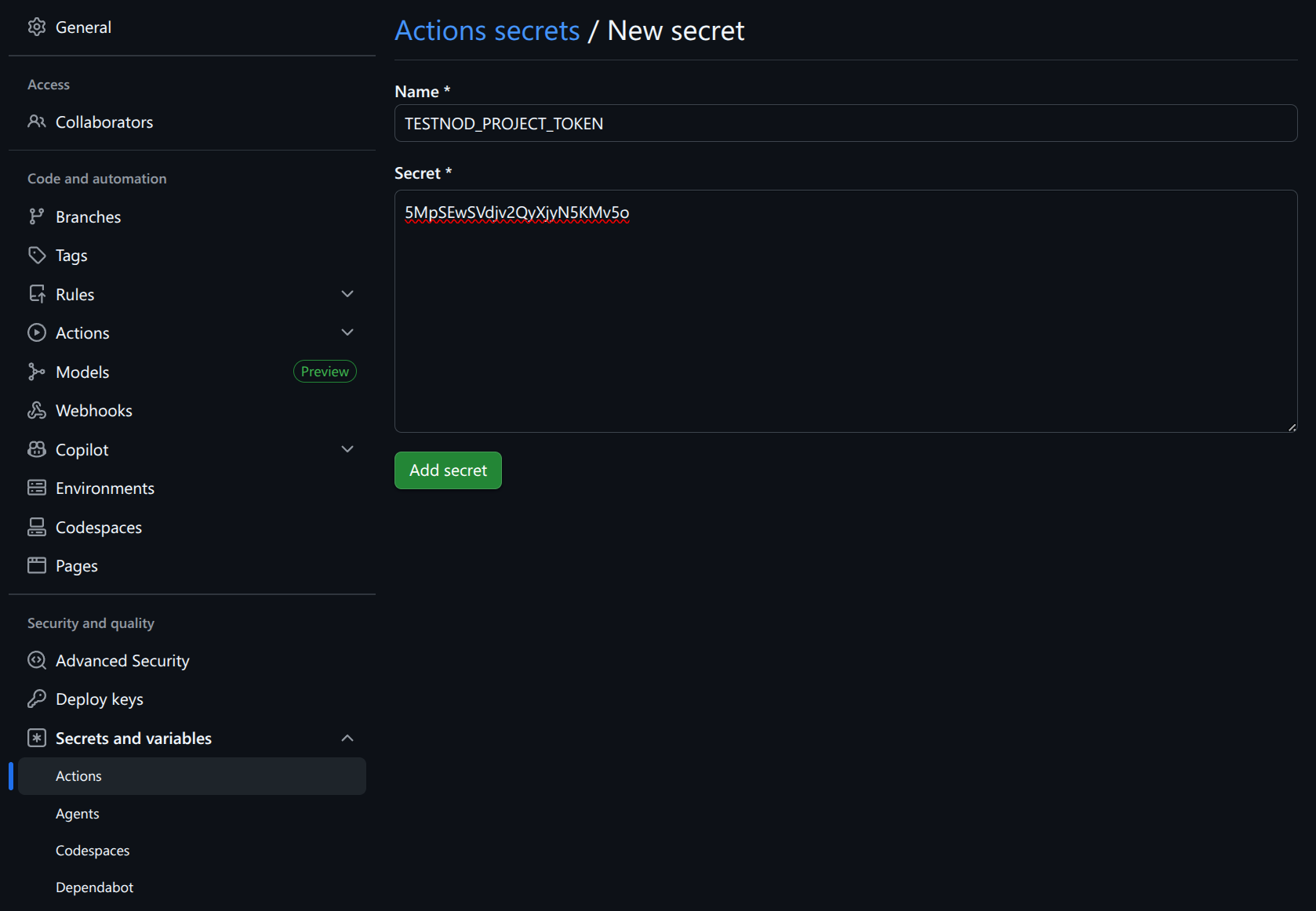
For more information on GitHub secrets, see "Using secrets in GitHub Actions" in GitHub's documentation.
Add the upload step
Add the upload step after your test step. The if: ${{ !cancelled() }} directive runs the upload on both passing and failing test runs, since the failing ones are usually what you most want to inspect, while still letting a cancelled workflow stop cleanly.
The following workflow snippet shows an example of a test job that runs RSpec and uploads the JUnit XML report to TestNod:
jobs:
  test:
    runs-on: ubuntu-latest
    steps:
      - uses: actions/checkout@v4

      - name: Run tests
        run: bundle exec rspec --format progress \
          --format RspecJunitFormatter --out tmp/rspec.xml

      - name: Upload test results to TestNod
        if: ${{ !cancelled() }}
        uses: testnod/testnod-uploader-action@v1
        with:
          file: tmp/rspec.xml
          token: ${{ secrets.TESTNOD_PROJECT_TOKEN }}
          tags: ci,rspec
          ignore-failures: true
That single step covers the whole upload. By default the action uploads the file and finalizes the run in one pass, so a workflow that produces one JUnit XML file needs nothing else.
Action inputs
| Input | Required | Default | What it does |
|---|---|---|---|
token |
Yes | — | The project token. Read it from the secret you created above. |
file |
Conditional | "" |
Path to the JUnit XML report. Required unless finalize is set to only. |
tags |
No | "" |
Comma-separated tags applied to the run. Tags group runs in the dashboard and scope TestNod's analysis to comparable runs. |
ignore-failures |
No | false |
When true, an upload error logs a warning instead of failing the step. |
build-id |
No | ${{ github.run_id }} |
The identifier that groups uploads into one TestNod run. Override it to split runs apart or merge them. |
finalize |
No | true |
true uploads the file and finalizes the run, false uploads without closing the run, and only finalizes without uploading. |
uploader-version |
No | latest |
Pins the underlying uploader to a specific version instead of tracking the latest release. |
Metadata attached automatically
The action reads the branch name, commit SHA, and build ID from the workflow environment, and it builds a link back to the GitHub Actions run. All of it travels with the upload, so the TestNod run page points straight back at the CI run that produced it. None of it needs to be passed by hand.
Why if: ${{ !cancelled() }}
The directive does two things worth calling out:
- It runs the upload step even when
bundle exec rspecexits non-zero, so a failing run still reaches TestNod. - It's preferred over
if: always()because GitHub's own docs warn thatalways()can keep a workflow from being cancelled in a timely manner, since cancellation signals get swallowed alongside failure signals.
Matrix and parallel builds
Matrix jobs and parallel runners share the same github.run_id, which the action uses as the default build-id. Every shard that uploads with that build ID joins the same TestNod run, which ends up made of one upload per shard.
Because the run stays open while shards are still reporting, each shard uploads with finalize: false, and a follow-up job finalizes once with finalize: only:
jobs:
  test:
    strategy:
      fail-fast: false
      matrix:
        ruby: ["3.2", "3.3"]
    runs-on: ubuntu-latest
    steps:
      - uses: actions/checkout@v4

      - name: Run tests
        run: bundle exec rspec --format RspecJunitFormatter --out tmp/rspec.xml

      - name: Upload test results to TestNod
        if: ${{ !cancelled() }}
        uses: testnod/testnod-uploader-action@v1
        with:
          file: tmp/rspec.xml
          token: ${{ secrets.TESTNOD_PROJECT_TOKEN }}
          tags: ci,rspec
          ignore-failures: true
          finalize: false

  finalize-testnod:
    needs: test
    if: ${{ !cancelled() }}
    runs-on: ubuntu-latest
    steps:
      - name: Finalize TestNod run
        uses: testnod/testnod-uploader-action@v1
        with:
          token: ${{ secrets.TESTNOD_PROJECT_TOKEN }}
          finalize: only
needs: test together with if: ${{ !cancelled() }} on the finalize job means it runs after the matrix on both success and failure, while still stopping cleanly if the workflow is cancelled. Setting fail-fast: false keeps the matrix from cancelling its siblings on the first red shard, which would otherwise skip those uploads.
If you would rather track each matrix combination as its own TestNod run, with separate history and alerts per combination, give each shard a distinct build-id and let each finalize on its own with the default finalize: true. A value like build-id: ${{ github.run_id }}-ruby-${{ matrix.ruby }} is enough to keep the runs apart, and the separate finalize job is no longer needed.
Pull requests from forks
GitHub Actions does not expose secrets to workflows triggered by pull requests from forks. On those runs the token input is empty, and the TestNod API rejects the upload with a 404. With ignore-failures: true the step won't fail your workflow, but the upload still won't land. There are two ways to handle it:
- Gate the upload step so it only runs for pushes and internal pull requests by adding
github.event_name == 'push' || github.event.pull_request.head.repo.full_name == github.repositoryto the step'sifcondition, alongside the!cancelled()check. - Run external-fork tests in a separate workflow that does not attempt an upload.
Reusable workflow
If you maintain many repositories, factor the upload step into a reusable workflow and call it from each project. The action's contract is small enough that a short reusable workflow covers the common cases, and every repository then picks up changes from one place.
What's next
The Test run page tour walks through the insights TestNod surfaces once your runs start arriving. If a run doesn't show up or its status looks wrong, Troubleshooting uploads covers the most common causes.