
GitLab CI/CD integration for JUnit XML uploads
The TestNod uploader component sends your JUnit XML reports to TestNod from a GitLab CI/CD pipeline. It keeps the change to your pipeline down to a single include, and it handles the upload and finalize flow for you, so there are no API calls to script yourself.
If you haven't created a project yet, the Quickstart walks through that and adding your first upload step. This page picks up from there, covering the component's inputs along with the patterns for parallel jobs, matrix builds, and merge requests from forks.
Add the project token as a CI/CD variable
In GitLab, open your project's Settings → CI/CD → Variables and add a variable named TESTNOD_TOKEN with the project token from your project's settings page in TestNod as the value. Mark it as Masked so it never shows up in job logs. TESTNOD_TOKEN is the variable name the component reads by default, so nothing else has to be wired up. If you store the token under a different name, pass that name through the token-variable input.
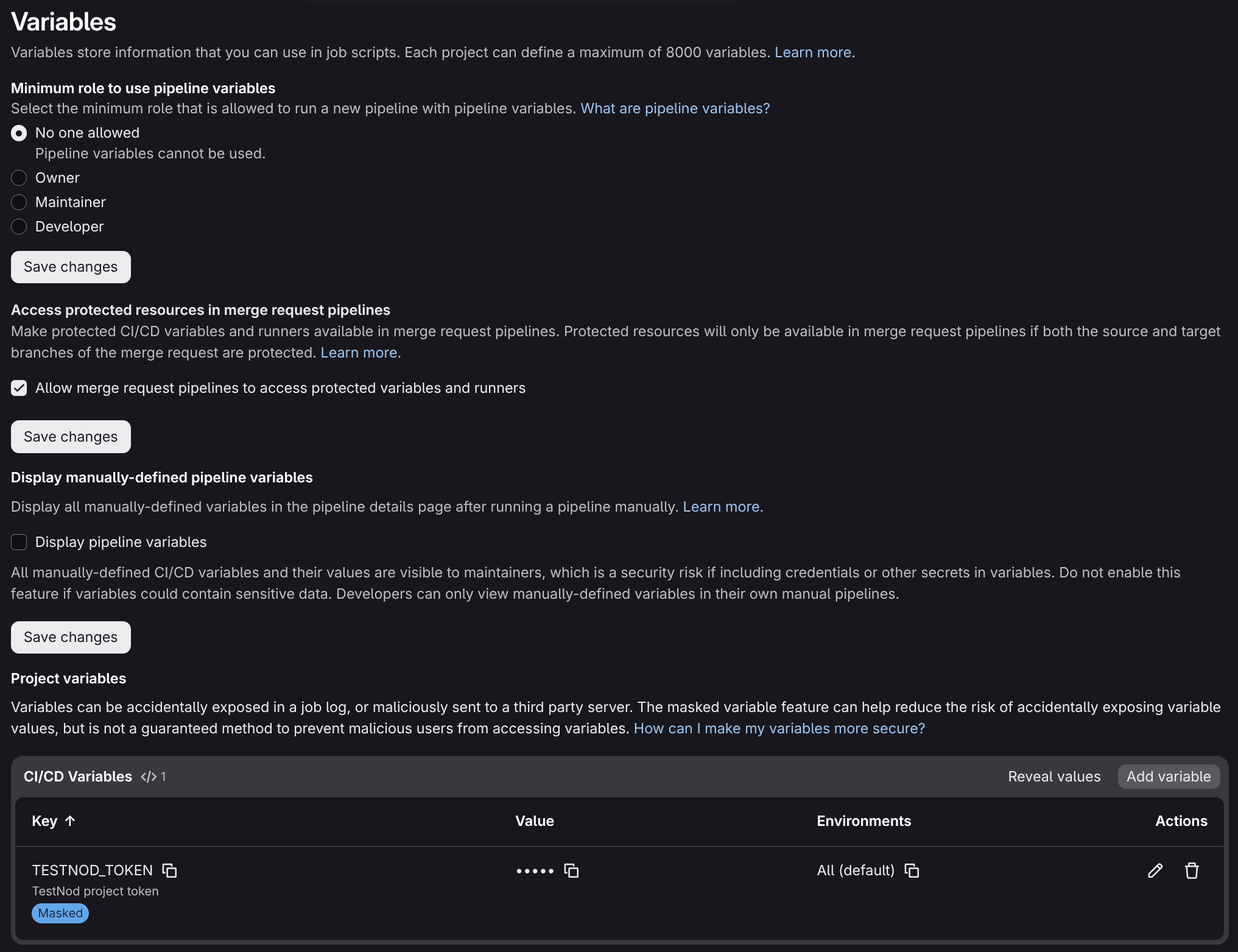
For more on CI/CD variables, see "CI/CD variables" in GitLab's documentation.
Add the upload step
Pull the component in with an include block and expose your JUnit report as a job artifact. The component adds one job to your pipeline that runs in the .post stage by default, so it comes after every other job. It runs with when: always built in, so results upload on both passing and failing runs, and the failing ones are usually what you most want to inspect.
The following config runs RSpec and uploads the JUnit XML report to TestNod:
include:
  - component: gitlab.com/testnod/testnod-uploader/[email protected]
    inputs:
      file: tmp/rspec.xml
      tags: ci,rspec
      ignore-failures: true

rspec:
  stage: test
  image: ruby:3.3
  script:
    - bundle exec rspec --format progress --format RspecJunitFormatter --out tmp/rspec.xml
  artifacts:
    when: always
    paths:
      - tmp/rspec.xml
That single include covers the whole upload. Because the upload job runs in the .post stage, it automatically picks up the artifacts your test jobs produced, so artifacts: when: always on the test job is what keeps the report available even when the tests fail. By default the component uploads the file and finalizes the run in one pass, so a pipeline that produces one JUnit XML file needs nothing else.
Component inputs
| Input | Required | Default | What it does |
|---|---|---|---|
token-variable |
No | TESTNOD_TOKEN |
Name of the CI/CD variable that holds your project token, not the token value. A variable named TESTNOD_TOKEN needs no override. |
file |
Conditional | "" |
Path or glob of the JUnit XML report(s). Required unless finalize is only. |
tags |
No | "" |
Comma-separated tags applied to the run. Tags group runs in the dashboard and scope TestNod's analysis to comparable runs. |
finalize |
No | "true" |
"true" uploads the file and finalizes the run, "false" uploads without closing the run, and only finalizes without uploading. |
ignore-failures |
No | false |
When true, an upload or finalize error logs a warning instead of failing the job. |
build-id |
No | $CI_PIPELINE_ID |
The identifier that groups uploads into one run. Override it to split runs apart or merge them. |
job-name |
No | testnod-upload |
Name of the job the component adds to your pipeline. Override it when you include the component more than once so the jobs don't collide. |
stage |
No | .post |
Stage the upload job runs in. The default .post stage runs after every other stage. |
image |
No | curlimages/curl:8.14.1 |
Container image for the upload job. Any image with curl and a POSIX shell works. |
uploader-version |
No | latest |
Pins the underlying uploader to a specific version. The default latest re-downloads it on every run. |
Metadata attached automatically
The component reads the branch name, commit SHA, and build ID from GitLab's predefined variables, and it builds a link back to the pipeline. All of it travels with the upload, so the TestNod run page points straight back at the pipeline that produced it. None of it needs to be passed by hand.
Parallel and matrix builds
GitLab's parallel keyword splits one job across several instances, and a matrix build runs the same job across several variable combinations. Every job in the pipeline shares the same $CI_PIPELINE_ID, which the component uses as the default build-id, so their reports all belong to the same TestNod run, which ends up made of one upload per report.
Have each instance write its report to a distinct filename, expose them all as artifacts, and point the component's file input at a glob. The single upload job in the .post stage collects every matching report and finalizes the run once:
include:
  - component: gitlab.com/testnod/testnod-uploader/[email protected]
    inputs:
      file: tmp/rspec-*.xml
      tags: ci,rspec
      ignore-failures: true

rspec:
  stage: test
  image: ruby:3.3
  parallel: 3
  script:
    - bundle exec rspec --format RspecJunitFormatter --out "tmp/rspec-${CI_NODE_INDEX}.xml"
  artifacts:
    when: always
    paths:
      - tmp/rspec-*.xml
To fan out across distinct suites, such as one job running RSpec and another running Jest, give each its own upload with finalize: "false" and close the run once with a finalize: "only" include. Set a distinct job-name on each so the injected jobs don't collide:
include:
  - component: gitlab.com/testnod/testnod-uploader/[email protected]
    inputs:
      job-name: testnod-upload-rspec
      file: tmp/rspec.xml
      tags: ci,rspec
      finalize: "false"
  - component: gitlab.com/testnod/testnod-uploader/[email protected]
    inputs:
      job-name: testnod-upload-jest
      file: tmp/jest.xml
      tags: ci,jest
      finalize: "false"
  - component: gitlab.com/testnod/testnod-uploader/[email protected]
    inputs:
      job-name: testnod-finalize
      finalize: "only"
If you would rather track a suite as its own TestNod run, with separate history and alerts, give it a distinct build-id and let it finalize on its own with the default finalize: "true". A value like build-id: $CI_PIPELINE_ID-rspec keeps the runs apart, and the separate finalize job is no longer needed.
Protected variables and forks
GitLab only injects Protected variables into pipelines running on protected branches and tags. If you mark TESTNOD_TOKEN as Protected, pipelines from forks or unprotected feature branches won't receive it, the component will have no token, and the upload will fail. With ignore-failures: true the job logs a warning instead of failing the pipeline, but the upload still won't land. Leave the variable unprotected to report from every branch, or keep it protected and accept that only protected branches reach TestNod.
Demo
A complete working example lives at testnod/testnod-gitlab-demo. Its .gitlab-ci.yml runs the test suite from a Ruby on Rails application and exposes the JUnit XML report as an artifact for the component to upload, so you can read a full pipeline end to end or fork the repo, drop in your own project token, and watch a run land in TestNod.
What's next
The Test run page tour walks through the insights TestNod surfaces once your runs start arriving. If a run doesn't show up or its status looks wrong, Troubleshooting uploads covers the most common causes.