
Skipped test creep alerts for CI test runs
TestNod's skipped test creep detection watches the percentage of tests marked as skipped in your JUnit XML reports on every CI run and fires an alert when the median skip rate across recent runs crosses a configurable threshold. The check runs automatically against every new test run that finishes processing, so there's nothing extra to wire up in your CI.
How TestNod detects skipped test creep
When a test run finishes processing, TestNod takes the 20 most recent processed runs in the project that share the same set of tags as the new run. For each run, it computes the skip rate as a percentage:
skip_percentage = (skipped_count / total_tests) * 100
Runs with zero total tests are excluded. TestNod then takes the median of those percentages and the alert fires when:
median_skip_percentage >= threshold_percentage
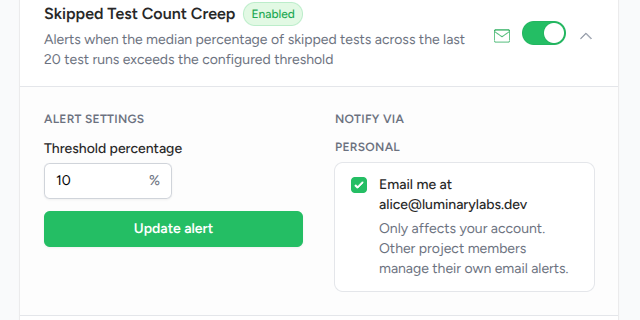
The default threshold is 10%. If at least 10% of tests have been skipped on average (median, not mean) across the last 20 same-tag runs, the alert fires.
Why median, not the current run
A single run with a high skip rate is often a one-off. Common causes include:
- Someone debugging locally and skipping a suite for that run.
- A feature flag toggling an entire suite off.
- A runtime being unavailable during that run.
Taking the median across 20 runs filters out those one-offs so the alert fires when skipping is the steady state, not the exception.
The 20-run baseline for skip rate analysis
Skipped test creep detection needs at least 20 processed runs on the same set of tags before it can fire on a project. With fewer than that on the matching tag set, TestNod skips the check and no event is recorded. Once enough history accumulates on a given tag combination, the alert starts evaluating each subsequent run.
Runs that reported no tests at all are dropped from the median, because there is no skip rate to draw from them. A few of those in the window are fine and the alert still fires, but if fewer than 15 of the 20 came back with results, TestNod skips the check rather than take a median from a thin sample.
Example: detecting a steady skip rate
Your project tags every CI run with ci and integration and uses the default 10% threshold. Over the last 20 runs on that tag set, the skip rates have come in as:
8%, 9%, 11%, 10%, 12%, 11%, 9%, 10%, 11%, 13%,
12%, 10%, 11%, 12%, 14%, 11%, 10%, 12%, 13%, 11%
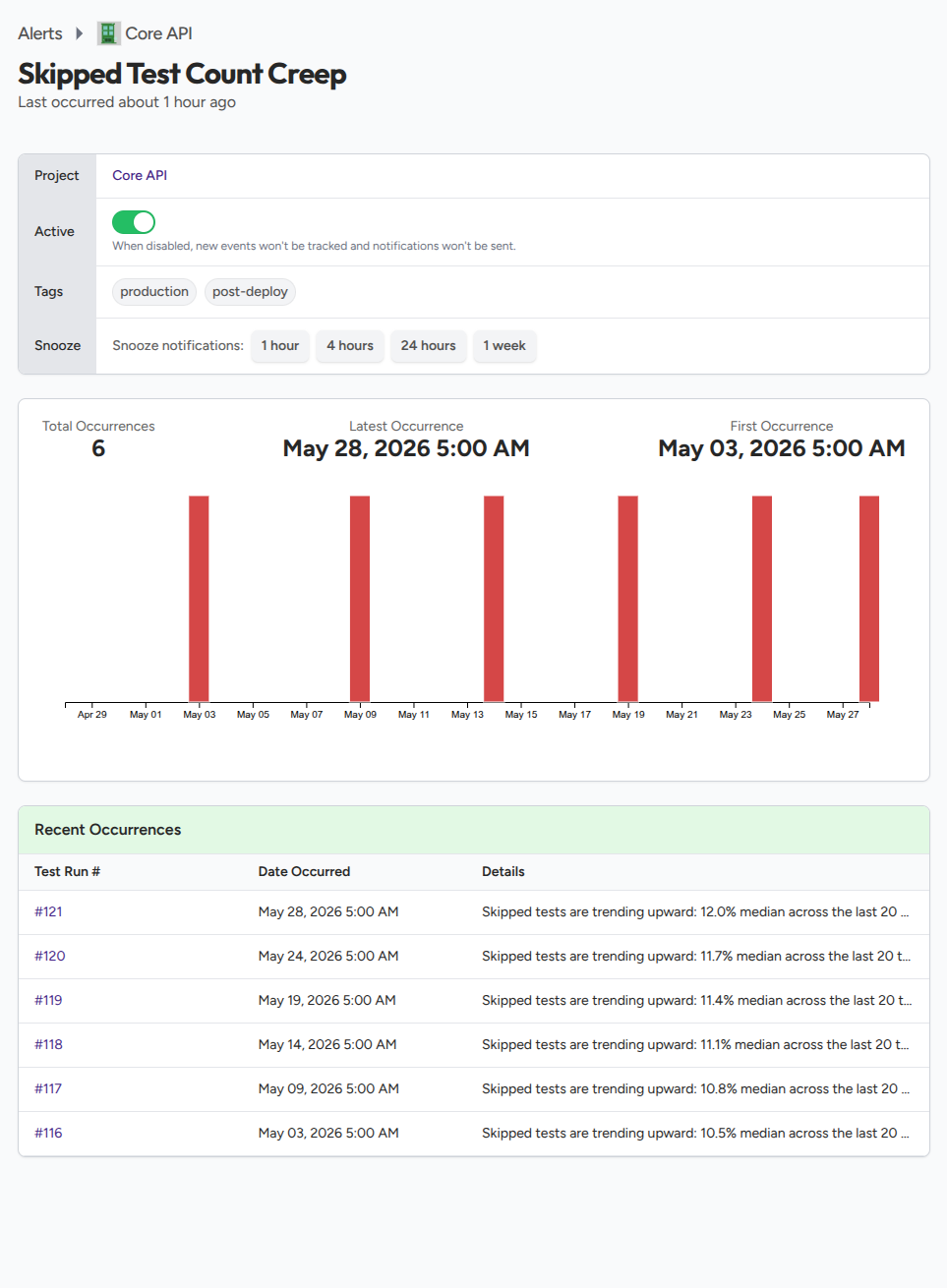
The median across those 20 values is 11%, which is above the 10% threshold. The next time a run finishes with the same tag set, the alert fires with a recorded median of 11%, the new run's skip count and total tests, and the tag set used for the comparison.
What the alert event shows
When the alert fires, the event records the new run's skip rate, the median across the recent 20-run window, the raw skipped count and total test count from the new run, the threshold the check used, and the tag set used for the comparison. The alert detail page links back to the triggering run so you can open it and see which tests were skipped.
Tuning the skip rate threshold
The right threshold depends on how disciplined your team is about deleting or fixing skipped tests:
- 5% is aggressive. Most teams cannot keep skips this low and the alert will fire often.
- 10% (default) is a reasonable starting point for projects that want to keep skipped tests in check.
- 20% or higher says you have decided to live with a meaningful chunk of skipped tests and only want to know when the number grows further.
Project admins set the threshold from the alert configuration page. See Configuring alerts for the walkthrough.
What the alert does not catch
- Projects without 20 same-tag runs yet. The check needs 20 processed runs on the same tag set before it can fire. With fewer than that, no event is recorded until the window fills in. A median computed on three or four runs swings too widely to be a useful signal.
- Skips concentrated in one suite. The check looks at totals per run. For example, if your end-to-end suite is fully skipped but is small relative to your unit suite, the project-wide median may stay below the threshold. Tag your suites separately if you want each one compared on its own.
- Reasons for the skip. TestNod knows a test was skipped, but not why. Use your test runner's logs or your version control history to find out.
Where to start
Once your project has 20 same-tag runs of history, an admin can enable the skipped test creep alert on the alert configuration page and set the threshold. Each subsequent test run is then evaluated against the configured rate. When the median crosses the threshold, an event is recorded on the alert detail page and a notification email is sent to project members who have not opted out.
If you haven't sent your first test run yet, the Quickstart walks through generating JUnit XML reports and uploading them from your CI in about five minutes.