
Webhooks for CI test run and alert events
Webhooks let TestNod push test run results and alerts into your own tooling. When a run finishes processing or an alert fires, TestNod posts a signed JSON payload to whatever HTTPS endpoint you register, so you can open tickets, update a dashboard, or kick off a follow-up job without polling for changes.
A project can have as many endpoints as you need, each subscribed to its own events, and they run alongside email and Slack notifications rather than replacing them.
Webhooks push data to you as events happen. When you would rather pull data on demand, for example to backfill a report or check a run from a script, the JSON API returns the same test run data using an organization-wide API key.
What you need to receive webhooks
Webhooks are configured per project, and only organization admins see the options. You need an endpoint that accepts a POST with a JSON body and answers with a 2xx status. It must be reachable over HTTPS on a public address, since TestNod rejects any URL that resolves to a private, loopback, or internal address. During development a tunnelling service works well, because it gives you a public HTTPS URL that forwards to your machine.
Add a webhook endpoint
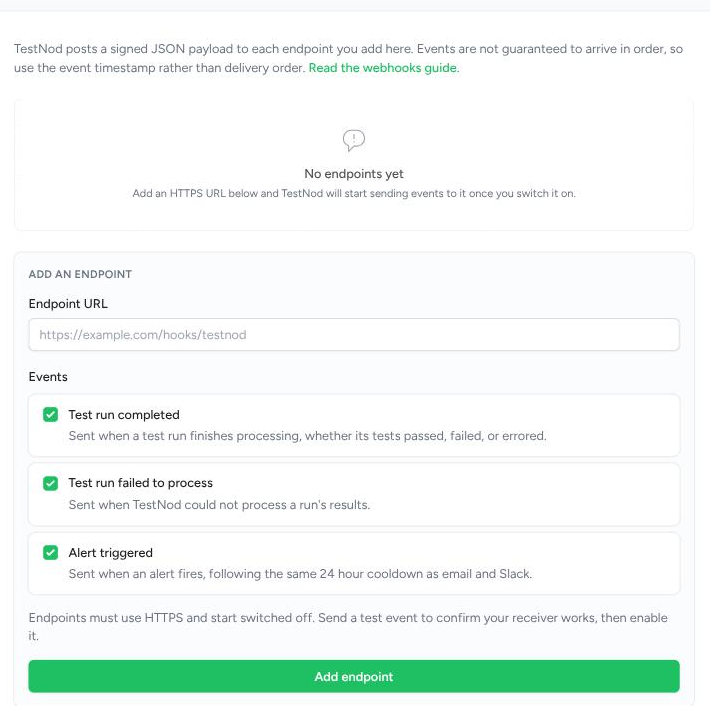
Open the project, go to Settings, and find the Webhooks card. Paste your URL, tick the events you want, and choose Add endpoint.
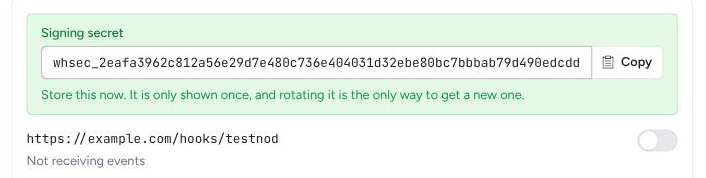
New endpoints start switched off, which gives you room to check your receiver before real traffic arrives. TestNod shows the signing secret once, right after the endpoint is created. It starts with whsec_, and since it is never displayed again, copy it then and store it somewhere safe. Rotating is the only way to get a new one.
Use Send test event to deliver a ping to your endpoint. The result appears immediately, both as a message and as a row in the endpoint's delivery list, so you can confirm the URL and your signature check work. Test events are always allowed, even while the endpoint is off, and a failed one never disables anything. Once a ping succeeds, switch the endpoint on.
Choose which events to receive
Each endpoint subscribes to events independently, so you can send run results to one system and alerts to another. Ticking or unticking an event on an existing endpoint saves right away.
- Test run completed. Sent when a run finishes processing, whether its tests passed, failed, or errored. Filter on the
resultfield rather than subscribing to a separate event. - Test run failed to process. Sent when TestNod could not process the results you uploaded, for example when the JUnit XML is malformed.
- Alert triggered. Sent when an alert fires. This follows the same 24 hour cooldown and snooze rules as email and Slack, so a repeatedly firing alert produces at most one webhook per day.
The webhook payload envelope
Every event arrives in the same envelope, whatever its type. Only the contents of data differ from one event type to another.
{
  "id": "0f5c8f8e-9a5e-4a0e-9a1e-3f0b6a2b9c11",
  "type": "test_run.completed",
  "version": 1,
  "created_at": "2026-08-25T09:14:22Z",
  "project": {
    "id": "778b5262-b7fb-4d8c-8b59-82ea05fc198f",
    "name": "Core API"
  },
  "data": {
    "id": 481,
    "build_id": "ci-4821",
    "status": "processed",
    "result": "tests_failed",
    "totals": { "tests": 1240, "failures": 3, "errors": 0, "skipped": 12 },
    "duration": 184.62,
    "branch": "main",
    "commit_sha": "9f2c1ab4e7d3",
    "ci_run_url": "https://ci.example.com/builds/4821",
    "tags": ["unit"],
    "started_at": "2026-08-25T09:11:18Z",
    "url": "https://testnod.com/projects/778b5262-b7fb-4d8c-8b59-82ea05fc198f/test_runs/481"
  }
}
The id is unique per event and stays the same across retries, so store it and ignore an id you have already processed. The version field belongs to the event type rather than to webhooks as a whole, which means one payload can gain fields without disturbing your handling of the others. Treat added fields as expected and pin your parsing to the version you tested against.
Deliveries are not ordered. A retried event can arrive after a newer one, and two events fired close together can land in either order, so use created_at and the run or alert identifiers to work out sequence rather than relying on arrival order.
What each event type contains
A test_run.completed event carries everything in the example above: the run's number in the project, the build id your CI sent, the totals, how long the run took, the branch and commit, the tags, and a link back to the run page in TestNod.
A test_run.failed event identifies the run the same way, but swaps the results for a failure_message explaining what went wrong, since there are no totals to report. TestNod sends it only when none of the files you uploaded for a build could be processed. If some files imported and others failed, there are still results worth reporting, so that run arrives as a test_run.completed with a tests_errored result instead.
An alert.triggered event describes the alert, the measurements behind it, and the run that set it off:
{
  "id": "b0a51d7c-1c2e-4f8b-90d7-6f2f6cf8f2c1",
  "type": "alert.triggered",
  "version": 1,
  "created_at": "2026-08-25T09:14:24Z",
  "project": {
    "id": "778b5262-b7fb-4d8c-8b59-82ea05fc198f",
    "name": "Core API"
  },
  "data": {
    "alert": {
      "id": "3c9f0a1b-77d2-4c3a-9a6d-1e2b3c4d5e6f",
      "type": "failure_rate_spike",
      "name": "Failure Rate Spike",
      "url": "https://testnod.com/alerts/3c9f0a1b-77d2-4c3a-9a6d-1e2b3c4d5e6f"
    },
    "event": {
      "metadata": {
        "failure_rate": 18.4,
        "baseline_failure_rate": 1.2,
        "failed_count": 228,
        "total_tests": 1240,
        "threshold_percentage": 15.0,
        "runs_analyzed": 20,
        "tags": ["unit"]
      },
      "triggered_at": "2026-08-25T09:14:24Z"
    },
    "test_run": {
      "id": 481,
      "build_id": "ci-4821",
      "branch": "main",
      "commit_sha": "9f2c1ab4e7d3",
      "url": "https://testnod.com/projects/778b5262-b7fb-4d8c-8b59-82ea05fc198f/test_runs/481"
    }
  }
}
The keys inside metadata depend on which alert type fired, since a flakiness alert reports different measurements than a performance regression. The test_run object is null for the rare alert that isn't tied to a specific run.
Verify the webhook signature
Every request carries these headers:
| Header | Contents |
|---|---|
X-Webhook-Event |
The event type, for example test_run.completed |
X-Webhook-Delivery |
Id of this delivery, unchanged across its retries |
X-Webhook-Timestamp |
Unix timestamp of the attempt |
X-Webhook-Signature |
v1= followed by the HMAC-SHA256 digest |
X-Webhook-Version |
Version of the payload |
The signature covers the timestamp and the raw body joined by a dot, <timestamp>.<body>, keyed with your signing secret. Including the timestamp is what stops someone replaying a captured request later, so check that the timestamp is recent as well as checking the digest. Five minutes is a reasonable window. Compare digests with a constant-time function, and sign the raw body exactly as received rather than a re-encoded version of it.
In a Rails controller:
def valid_webhook?(request, secret)
  timestamp = request.headers["X-Webhook-Timestamp"].to_i
  return false if (Time.now.to_i - timestamp).abs > 300

  body = request.raw_post
  digest = OpenSSL::HMAC.hexdigest("SHA256", secret, "#{timestamp}.#{body}")

  ActiveSupport::SecurityUtils.secure_compare(
    "v1=#{digest}",
    request.headers["X-Webhook-Signature"].to_s
  )
end
In Node:
const crypto = require("crypto");

function validWebhook(headers, rawBody, secret) {
  const timestamp = Number(headers["x-webhook-timestamp"]);
  if (Math.abs(Date.now() / 1000 - timestamp) > 300) return false;

  const digest = crypto
    .createHmac("sha256", secret)
    .update(`${timestamp}.${rawBody}`)
    .digest("hex");

  const expected = Buffer.from(`v1=${digest}`);
  const received = Buffer.from(String(headers["x-webhook-signature"]));

  return expected.length === received.length && crypto.timingSafeEqual(expected, received);
}
Delivery timeouts and retries
Answer with any 2xx status to accept a delivery. Reply quickly and do the real work in the background, since TestNod waits ten seconds for a response before treating the attempt as failed.
A failed attempt is retried five times, spread over roughly nine hours:
| Attempt | Sent |
|---|---|
| 1 | Right away |
| 2 | 1 minute after attempt 1 |
| 3 | 5 minutes after attempt 2 |
| 4 | 30 minutes after attempt 3 |
| 5 | 2 hours after attempt 4 |
| 6 | 6 hours after attempt 5 |
Each delay is varied slightly so a batch of failures doesn't come back all at once. Timeouts, network errors, 429, 5xx, and any 4xx not listed below are all retried this way.
Some responses are not retried at all. A 400, 401, 403, 404, or 410 means the endpoint is gone or refusing the request, so TestNod disables it straight away rather than working through the schedule. Redirects are treated the same way, because TestNod does not follow them, which means a redirecting endpoint could never succeed. Register the final URL instead.
The hourly delivery limit
Each endpoint can receive up to 100 new events per hour, and the count resets at the top of every hour. Retries don't count against it, since a retry is the same event, so a receiver that is struggling still gets its full nine hours of attempts. Test events you send from the settings page don't count either.
Most projects never come close to the limit. It's there so an unusual burst, say a matrix build settling dozens of runs at once or a misconfigured pipeline uploading in a loop, can't turn into a flood against your server. Anything over the limit is dropped rather than queued, and it shows up in the delivery history as a failed delivery with rate_limited in the response column, so you can tell which events you missed. Dropped events are not sent once the hour rolls over.
If you hit the limit regularly, narrowing the events an endpoint subscribes to is usually the fix. For a higher ceiling, send a message to the TestNod team via the in-app chat or email support.
Check your delivery history
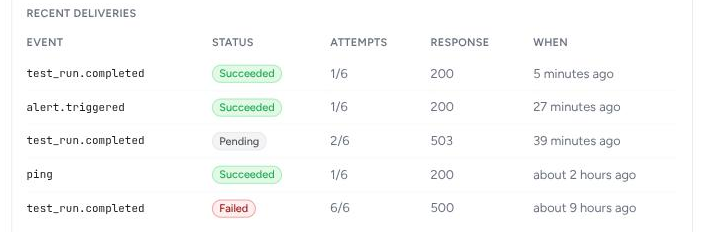
Each endpoint lists its ten most recent deliveries on the settings card, including test events. You get the event type, whether it succeeded, how many of the six attempts have been used, and the status code or error from the last attempt, which is usually enough to tell a receiver that is down from one that is rejecting the payload.
When an endpoint is disabled
An endpoint is disabled when one of those non-retried responses comes back, or when all six attempts fail. Disabling stops every future event immediately, not just the one that failed, and TestNod emails the organization's admins with the reason. The settings card shows a banner explaining what happened.

To recover, fix the receiver, send a test event to confirm it works, then switch the endpoint back on. Events that fired while it was off are not resent, so check the project's test runs and alerts in TestNod for anything you missed during the gap.
Rotate a signing secret
Rotate secret replaces the signing secret and shows you the new value once. The change takes effect immediately, so deliveries signed with the new secret will fail your check until you update the receiver. Plan for a short window, or accept both secrets briefly by verifying against either one during the changeover.
Delete an endpoint
Delete endpoint removes it along with its delivery history. Adding the same URL back later creates a new endpoint with a new signing secret, which is also how you point an existing subscription at a different URL.