
Test analytics
for your CI builds.
Your CI shows you one build at a time. TestNod keeps the results from all of them, so you can see which tests are flaky and when your test suite started getting slower.
Flaky tests and slow suites take weeks to show up
Flaky tests come back
A test fails, someone hits re-run, the build passes, and everyone moves on. A week later the same test fails again, and because the first failure left no record, it looks new. Across a whole team, those re-runs take hours.
Small slowdowns add up
Your suite takes a few seconds longer each week, and the pass rate drops from nearly 100% to under 90% over a couple of months. Because no single build looks bad, it rarely comes up until the suite is slow enough that everyone feels it.
Finding the pattern means reading logs
To learn which tests fail most often or which ones have slowed down, you'd have to open old builds one by one and compare their logs. Few teams have time for that, so the question goes unanswered.
See which projects are getting better or worse
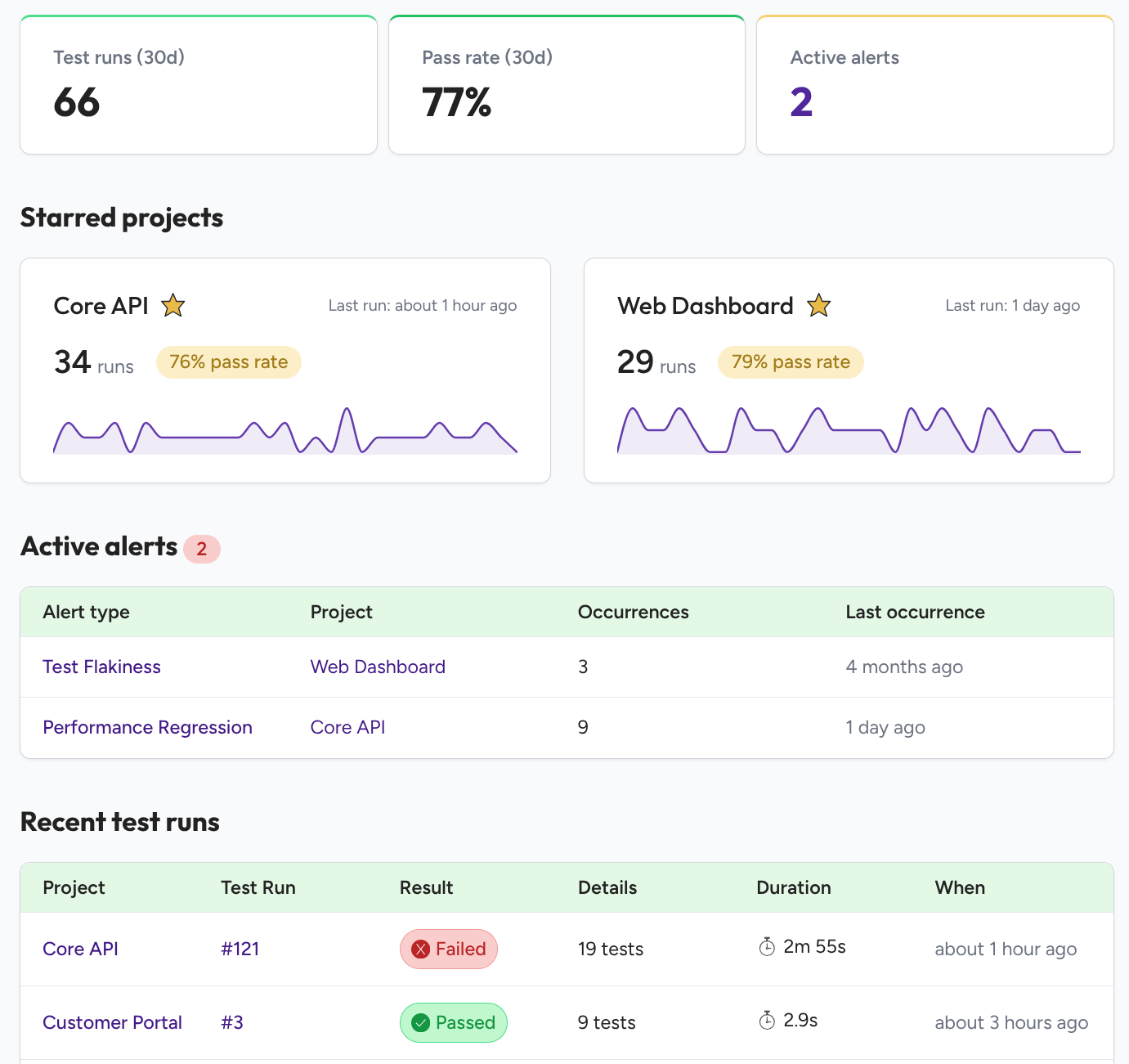
TestNod stores the result of every test from every run. Each project shows its recent pass rate and how that rate has moved in recent weeks, and when the number drops you can open the project to find the tests that changed and the build where it started.
Payments API
Last run: 2 hours agoMobile App
Last run: 5 hours agoTest analytics built from your JUnit XML reports
Your CI uploads the report after each run, and everything below comes from it.
One step in your CI config
Setup is one step that runs after your tests and uploads their report, with nothing to install on the runner. You can copy it for your CI service from the section further down, and if you split your suite across parallel jobs, TestNod merges their results back into one run.
Trends over time
Charts show how pass rates and test times change from build to build, and you can find the build where a change started. All your projects share one view, each measured against its own history, so a project that runs twice a week gets the same weight as one that runs 200 times a day.
Alerts for flaky tests and slow runs
TestNod alerts you when a test starts failing on and off or only passes after a retry, when runs slow down, when many tests fail at once, or when skipped tests pile up. You pick which alerts each project uses and how much change sets one off, and you can snooze any that fire too often.
What changed since the last run
Each run is compared with the last run like it, listing new failures, fixed tests, tests that needed a retry, slower tests, and tests added or removed. Failures with the same cause are grouped, so twelve failing tests can show up as three groups, and each test keeps a history of its pass rate and timing.
A short summary of each run
When a run finishes, TestNod writes a few sentences about it in plain English, covering the kinds of failures that showed up and which ones look related. You can read it before opening any test, and a summary of the whole week is at the top of the Monday email.
Send results to Slack or your tools
Alerts can go to a Slack channel as well as email, and each project picks which alerts reach Slack. If you have your own dashboards, TestNod can send results to them through signed webhooks as runs finish and alerts fire, or you can pull the same data through the API.
AI coding tools mean more code and more test runs
With coding assistants writing a growing share of the code, teams open more pull requests and run CI more often. Each extra run is another chance for a flaky test to block a merge, or for a slowdown to get through while everyone is busy with other work.
Set up CI test reporting in a few minutes
You don't install an agent or touch your test code.
Create a project (30 seconds)
Create a project in TestNod and copy its project token, which your CI uses to upload results.
Add to your CI pipeline (2 minutes)
Copy the snippet for your CI service below into your config file. If yours isn't listed, the Any CI tab has a shell script you can run anywhere, and the CI integration guides walk through Jenkins and Buildkite.
Check back after a few runs
The first run appears in the dashboard a moment after it finishes, and the second shows what changed since the first. Trend charts fill in over the next few runs, and alerts start once a project has enough runs to compare against.
- name: Upload test results to TestNod
  if: ${{ !cancelled() }}
  uses: testnod/testnod-uploader-action@v1
  with:
    file: tmp/rspec.xml
token: ${{ secrets.TESTNOD_PROJECT_TOKEN }}orbs:
testnod-uploader: testnod/[email protected]
jobs:
test:
steps:
- testnod-uploader/upload:
file: tmp/rspec.xml
workflows:
test-and-upload:
jobs:
- test:
context: testnodinclude:
- component: gitlab.com/testnod/testnod-uploader/[email protected]
inputs:
file: tmp/rspec.xml
tags: ci,rspec# 1. Start the upload.
response=$(curl -sS -X POST https://testnod.com/integrations/test_runs/upload \
-H "Project-Token: $TESTNOD_PROJECT_TOKEN" \
-F "test_run[metadata][build_id]=$BUILD_ID")
# 2. Send your test report.
upload_url=$(echo "$response" | jq -r .presigned_url)
curl -sS -X PUT -H "Content-Type: application/xml" \
--upload-file tmp/rspec.xml "$upload_url"
# 3. Finish the run.
curl -sS -X POST https://testnod.com/integrations/test_runs/finalize \
-H "Project-Token: $TESTNOD_PROJECT_TOKEN" \
-d "build_id=$BUILD_ID"What TestNod costs
TestNod is free during early access. Once paid plans launch, you can stay on the free tier or move to Team at $49 a month. You pay by the number of test runs, which you can count from your CI dashboard, and every plan includes unlimited members and projects, so adding a teammate doesn't change your bill.
Free
$0
For a single repository, with enough runs and history to spot your first flaky test.
Team
$49 / month
For a team that merges code every day. It keeps a year of history and adds the AI run summaries.
Every plan
All four alert types, set up per project and sent by email or to Slack.
Teams that join during early access get the Team plan at half price for their first year.
Get half off your first yearFrequently asked questions
Any CI service that can run a shell script works with TestNod. GitHub Actions, CircleCI, and GitLab each have a ready-made integration, and for Jenkins, Buildkite, Travis CI, or a self-hosted runner you copy a short script from the docs. On the test side, TestNod reads JUnit XML, which RSpec, pytest, JUnit, Cypress, Playwright, and most other frameworks can write.
Your data is encrypted in transit and at rest. TestNod stores what your test reports contain, such as test names, how long each test took, whether it passed, and any failure message, along with the branch and commit. TestNod never gets a copy of your source code or build artifacts.
Nothing while TestNod is in early access. When paid plans launch they start at $49 a month, priced by test runs with no charge per seat, and a free tier will stay available. If you join early access, your team gets 50% off the Team plan for its first year.
A few minutes for each project. You create the project in TestNod, then paste one step with its project token into your CI config, and the next test run sends its results.
After each run, TestNod compares it with the project's last 20 runs to look for flaky tests, slower runs, a jump in failures, and a growing number of skipped tests. Each project has its own settings for which checks run and how much change it takes to raise an alert. An alert names the tests involved and shows the numbers behind it, and it goes out by email or Slack no more than once a day.
When a test fails, or only passes after a retry, TestNod checks its record over the project's last 20 runs. If it failed or needed a retry in at least 30% of them, a share you can change for each project, TestNod treats it as flaky and sends an alert with the test name and the rate. A project needs 20 runs of history before this check starts.
Yes. When your CI reruns a failed test and it passes, TestNod keeps the first failure and marks the test as passed on retry. The build stays green, and the test counts toward flakiness as if it had failed. Maven Surefire reruns come through the report you already upload. For other runners, upload the rerun report with the retry option in the TestNod uploader for your CI.
An organization can have as many members and projects as you need. You invite people by email, and they sign in with a password or with their Google or GitHub account. Admins manage project settings and alerts, and everyone else can see all of it and snooze alerts.
No. TestNod reads JUnit XML, a standard report format that most test frameworks can write once you add a flag or a reporter to the test command. Your test code stays as it is.
Each parallel job uploads its own report, and TestNod combines them, so a suite split across ten containers shows up as a single run. This works for matrix builds, parallel_tests, pytest-xdist, and sharded Cypress or Playwright suites.
You can. Webhooks send results to your own tools as runs finish and alerts fire, and the API lets you pull the same data whenever you want it.
The TestNod docs FAQ goes into more detail on setup and alerts.
Try TestNod during early access
Early access is free, and when paid plans launch your team gets 50% off the Team plan for a year. Leave your email and we'll send you an invite. We can also help you set up the CI step.